
Assess the costs, capacity and quality of scaling label production
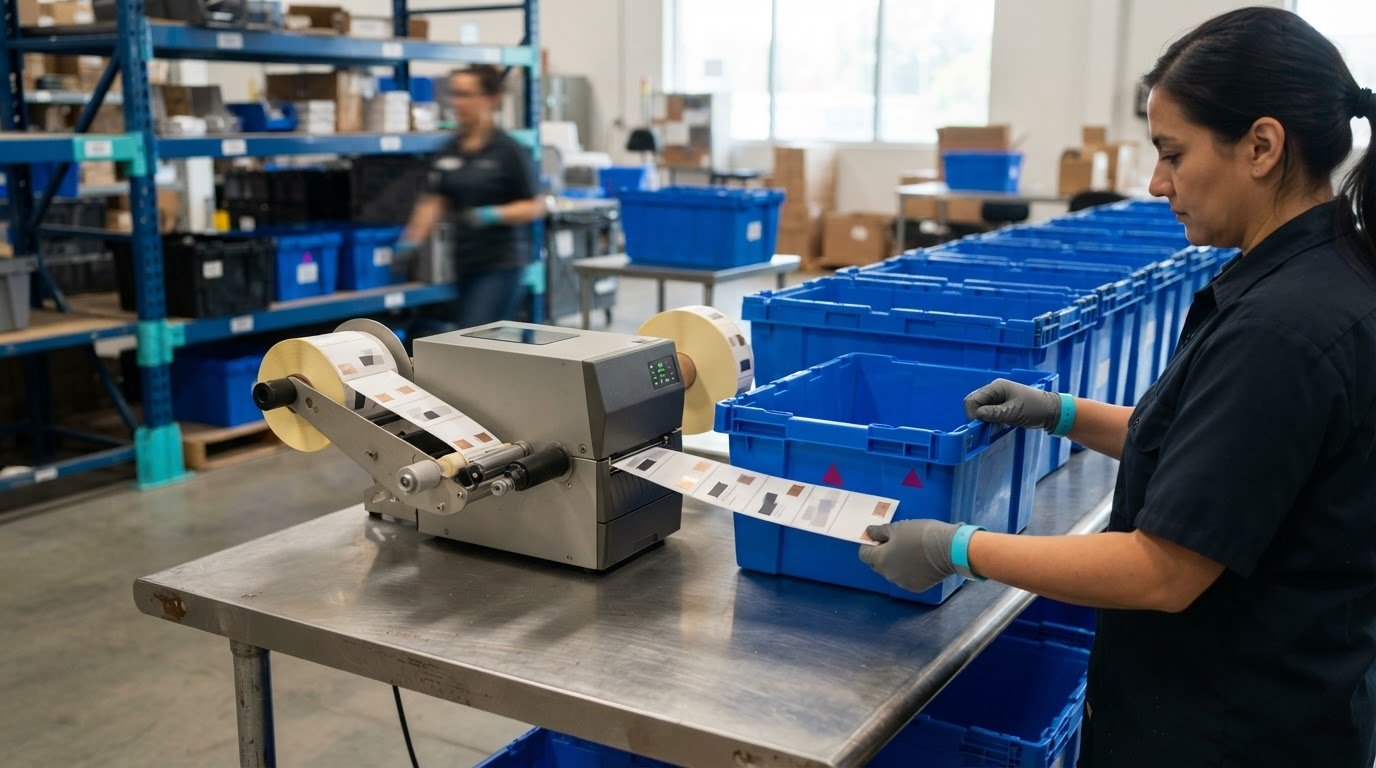
Short-run digital label printing can be profitable when lower setup costs and waste outweigh the value of producing only what you need. When scaling label production for a growing business, match printer capacity and workflow to real demand without compromising label quality.
Caution makes sense: adding equipment, materials and labour can increase costs before higher order volumes generate a return. Digital printing can make short runs and on-demand jobs more efficient by eliminating plates and reducing setup time and related waste. Profitability still depends on volume, materials, labour and how smoothly orders move through production.
This article explains how to assess capacity, maintain consistent quality across batches and integrate automation into your workflow. It also covers common growth challenges and how to plan investments around projected demand, so you can weigh operational trade-offs clearly.
Key Takeaways
- Compare expected order volume with equipment, staffing and workflow capacity to spot constraints before they affect delivery.
- Use documented procedures and small production runs to protect consistency as batch sizes increase.
- Look for workflow bottlenecks and connect production data with inventory and logistics systems where it helps.
- Plan for added complexity in materials, vendors, inventory and market requirements as the business grows.
- Forecast the technology, people and systems needed for expansion, then align investments with projected demand.
1. Assessing production capacity and quality
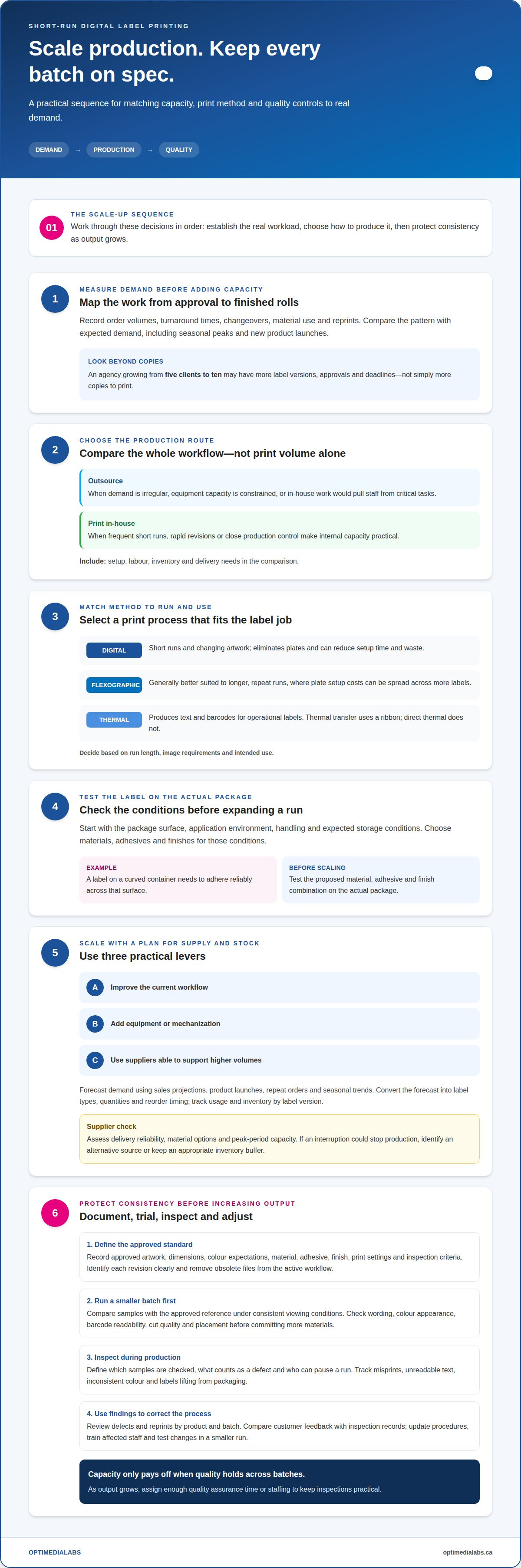
Begin with demand, then map each production step from artwork approval to finished rolls. Record order volumes, turnaround times, changeovers, material use and reprints. Compare these trends with expected volume, including seasonal peaks and new product launches. For example, an advertising agency growing from five clients to ten may face more label versions, approvals and deadlines, not simply more copies.
Outsource when demand is irregular, equipment capacity is constrained or in-house production would divert staff from critical work. Print in-house when frequent short runs, rapid revisions or close production control make internal capacity practical. Compare the complete workflow, including setup, labour, inventory and delivery needs, rather than judging by print volume alone.
Digital printing suits short runs and changing artwork because it eliminates plates and can reduce setup time and waste. Flexographic printing uses plates, making it generally better suited to longer, repeat runs where setup costs can be spread across more labels. Thermal printing produces text and barcodes for operational labels. Thermal transfer uses a ribbon; direct thermal does not. Choose a method based on run length, image requirements and intended use.
Choose materials, adhesives and finishes by starting with the product’s conditions. Identify the package surface, application environment, handling and expected storage conditions. A label on a curved container, for example, needs to adhere reliably across that surface. For specialised adhesive requirements and technical bonding solutions across varied packaging materials, specialist resources like fossewaytapes.co.uk can provide guidance on high-performance adhesives. Test the proposed combination on the actual package before expanding production. This helps protect legibility and brand identity while reducing avoidable variation between batches.
Scale using three practical levers: improve the current workflow, add equipment or mechanization, and use suppliers able to support higher volumes. Forecast label demand using sales projections, product launches, repeat orders and seasonal trends. Turn each forecast into label types, quantities and reorder timing. Track usage and inventory by label version, then adjust orders when actual demand differs. This helps prevent both stockouts and obsolete labels after artwork changes.
Assess supplier capacity alongside your own. Consider whether suppliers can provide reliable, consistent inputs as requirements grow, and evaluate delivery reliability, material options and peak-period capacity. If an interruption could stop production, identify an alternative source or keep an appropriate inventory buffer. A dependable supply plan relies on clear specifications, consistent ordering information and communication about forecast changes.
Set quality checks before increasing production. Document approved artwork, dimensions, colour expectations and inspection steps. Review samples from new or revised runs, record defects and reprints, and use quality reports to identify recurring problems. Capacity is useful only if increased output preserves label performance and appearance across batches.
2. Maintaining consistent quality across batches
Larger runs magnify small process differences. If the first batch uses approved artwork but the next uses an outdated file, the label’s colour, wording or layout may change. Maintain a controlled production record for every label version, including approved artwork, material, adhesive, finish, print settings and inspection criteria. Give each revision a clear identifier and remove obsolete files from the active workflow. This gives operators shared expectations and reduces avoidable variation between shifts.
Standard operating procedures should describe each step, from file approval to final inspection. Specify who releases artwork, how materials are matched to an order and what to do when a defect appears. Use clear instructions that trained operators can follow without relying on memory. For a food jar, for example, the procedure can identify the approved label version and checks for text legibility, placement and adhesion. Update the record whenever the product or process changes.
Before expanding a revised process, run a smaller production batch. Compare its labels with the approved reference under consistent viewing conditions. Check relevant details, such as wording, colour appearance, barcode readability, cut quality and placement. Record the results and correct the process before committing more materials. A short trial can reveal whether changes to artwork, stock or finishing affect the finished label.
Follow a consistent inspection plan instead of relying on a final glance. Define which samples are checked during production, what counts as a defect and who can pause a run. Track issues such as misprints, unreadable text, inconsistent colour or labels lifting from packaging. Review findings by product and batch. A recurring defect may indicate a file-control problem, material mismatch, equipment setup issue or training gap. Automated checks can flag defects quickly, while operator review adds context.
Keep oversight aligned with output. As batches grow, quality assurance staffing or assigned inspection time may need to increase to keep checks practical. Train operators to apply the same criteria consistently and efficiently. Use a sample label during training, then ask staff to identify specific differences from the approved version. This makes expectations clear and gives team members a shared reference for reporting issues.
Close the loop with customer feedback and production data. Reviews, surveys and direct reports can reveal issues internal checks miss, such as labels that are difficult to read or separate from packaging during use. Compare feedback with inspection records and reprint causes. If an issue recurs across batches, update the procedure, train affected staff and test the change in a smaller run. Document the results before applying the revised process to routine production.
3. Automation and workflow integration
Automation supports growth when it removes repeated manual steps without creating disconnected systems. Map an order from customer request through artwork approval, production scheduling, printing, finishing and shipment. Mark each handoff, then note where staff re-enter information or wait for approval. Bottlenecks often occur between teams, not at the printer. Improving a handoff can smooth workflow before adding equipment.
Where practical, connect production data with inventory and logistics records. An enterprise resource planning (ERP) system can bring these details together, helping managers see whether materials are available for scheduled jobs. For example, a production order can draw on a shared record of label stock and finished goods. Data must be accurate and consistent: duplicate item names or outdated quantities can undermine plans, even with integrated software.
Let the process guide automation, not the other way around. Start with a repetitive task that causes delays, such as copying order details into a production schedule. Define the required information, who approves it and what happens when details are missing. Automate the step only after clarifying the workflow. This helps prevent speeding up errors or creating a new queue for exceptions.
Customer relationship management (CRM) tools can connect customer requests with marketing automation, sales management, inventory tracking, accounting and shipping systems. A revised product label, for example, may require updated artwork approval, stock planning and a changed shipping schedule. Integration can make these changes visible across teams. Assign clear ownership for each record so staff know which system contains the current order, artwork status and delivery details.
Use workflow data to pinpoint delays. Track where orders pause, how often information needs correction and which production stages generate repeat work. Then adjust the process, for example by routing complete orders directly to scheduling and incomplete ones for review. Discuss the results with people handling daily operations. Their feedback can show whether the change removes a real bottleneck or simply shifts it elsewhere.
Equipment monitoring can help with planned maintenance. IoT-enabled machines can collect operating information and reveal patterns that may indicate potential downtime. Pair alerts with a clear response process: assign responsibility, record the issue and plan maintenance around production needs. If you are developing your workflow, begin with one machine or process and assess whether the information improves maintenance decisions before expanding monitoring.
Coordinate automation with sourcing and staff training. A new system may change how teams record material use, schedule jobs or share production updates. Document revised steps and train affected employees before putting the workflow into routine use. Review integrations as product lines, order patterns and shipping processes change. Regular reviews keep systems aligned with current work rather than an outdated process.
4. Challenges of rapid scaling
Rapid growth increases orders, staffing needs and operating costs at once. A label business may need more stock, production hours and shipping capacity before receiving customer payments. A scaling plan should map the cash and workload effects of each new account or product launch. For instance, a retailer adding several product variations may need more artwork approvals, label versions and replenishment requests, even when total unit volume seems manageable.
Processes that worked for a small team can become unclear as responsibilities multiply. One employee might once have approved artwork, scheduled printing and updated inventory. With more orders, that informal approach can lead to missed handoffs or conflicting instructions. Document who owns each decision, where the current job status is recorded and how to escalate exceptions. Review the process when roles or order patterns change instead of preserving routines designed for an earlier stage.
Supply coordination also becomes more complex. More product variations can mean more label stocks, ribbons, cores or packaging requirements to manage. Track material specifications and usage by product, then compare planned demand with actual consumption. Confirm suppliers can support changing volumes and communicate forecast updates early. If a delayed input could halt a job, identify an alternative source or a practical buffer for critical materials.
Logistics can become a separate constraint. Businesses shipping more orders must coordinate finished-goods storage, picking, packing and delivery information. Check where orders wait, where inventory records differ from physical stock and which handoffs cause repeat work. Outsourcing a repetitive task may free employees for customer service or production planning, but set clear responsibilities and expectations for each partner. Keep order status visible across internal teams and external providers.
Entering a new market adds another layer. Destinations may have distinct labelling standards, language expectations or product requirements. Treat each market entry as a defined project: identify applicable requirements, assign responsibility for artwork and review, and approve a market-specific version before production. Keep version records distinct enough to prevent a label intended for one destination being used for another. A growing brand must maintain product consistency while adapting required information.
Give people and culture attention as the team expands. Without consistent training and role expectations, new hires may learn different methods. Pair written procedures with practical instruction, and make it easy to raise production or customer concerns. Strategic hiring or outsourcing can address capacity gaps, but adding people without clear ownership can increase coordination work. Scaling risks also include a weaker customer experience if growth outpaces training and communication.
Do not treat every increase in demand as a reason to expand immediately. Compare confirmed orders, repeat demand, available staff and supply reliability before taking on new fixed costs. Set a review point after each growth phase. If rework, late shipments or inventory mismatches increase, address the underlying process before adding volume. A staged approach helps the business respond to growth without making operational strain the norm.
5. Investment needs
Commercial label printer and production-press costs in Canada vary according to printing method, output requirements, finishing needs and workflow. Build the budget around the entire setup, including equipment, software, materials, labour, maintenance and space, rather than comparing machine prices alone.
Cost per label also depends on production volume and job details. Include label stock, ink or ribbon, setup, labour, finishing, waste and outsourced work, then divide the total job cost by the number of usable labels produced. A short run may have higher setup costs per label, while repeat runs can spread setup across more units. Material selection and finishing requirements also affect the calculation.
Before investing, review projected demand by product and production period. Use expected orders, planned launches and seasonal patterns to estimate the workload equipment must handle. Compare that workload with current output and identify the constraint: printing speed, finishing, staff time, material handling or scheduling. A printer upgrade will not solve a finishing bottleneck if labels still wait for downstream work.
Compare buying equipment for current needs with choosing capacity that can accommodate planned growth. Consider precision, print quality, compatible materials, changeover requirements and the work required between jobs. A faster system may be a poor fit if it adds complexity the team cannot use effectively. Match the investment to the actual production mix and customer preferences.
Include supporting technology in the plan. Production software, connected inventory records and suitable hardware or networks can affect how well new equipment fits existing operations. Map the complete workflow before committing: order entry, artwork handling, scheduling, printing, finishing and fulfilment. This reveals where integration work, training or process changes may be needed alongside the machine.
Review the profit and loss statement, then list each planned expense and when it is likely to occur. Separate equipment costs from recurring inputs, staffing and system expenses. Consider how the investment will be funded and its effect on cash available for materials and daily operations. If demand projections change, revisit the timing and scale of purchases instead of treating the original plan as fixed.
Not every growth plan needs an in-house production facility. Using an established manufacturer’s infrastructure can avoid investing in your own equipment and space, while in-house printing provides direct control over scheduling and short-run requirements. Weigh these options against expected volume, turnaround needs, quality oversight and the value of keeping production internal.
For a practical discussion of equipment and workflow priorities, contact our team about your label production needs.
OptiMediaLabs Canada: Labelview software
OptiMediaLabs Canada offers Labelview software for businesses reviewing their label production workflow as demand grows. It can be considered alongside printer and finishing equipment when planning how to handle changing label requirements and higher output.
For colour label production, Afinia Color Label Printers can suit businesses bringing more label work in-house. RFID Label Printers support workflows that require RFID labels, while Afinia Label Cutters & Finishers can be part of a setup that includes finishing. The right combination depends on your label types, production process and capacity needs.
Contact OptiMediaLabs Canada to discuss Labelview software and label production equipment for your operation.
Make your next production decision with confidence
A practical plan for scaling label production for a growing business should connect equipment choices to the work you expect to handle next. Focus on the production gap that matters most now, then choose a step that supports growth without adding unnecessary complexity. As your needs evolve, OptiMediaLabs Canada offers Afinia Color Label Printers and RFID Label Printers to support different label workflows.
Discuss your production goals and equipment needs with OptiMediaLabs Canada today. A clear next step can help you build a production setup that’s ready to grow with your business.
Frequently Asked Questions
Q4: Is digital label printing profitable for short runs?
Digital printing can make short runs more cost-effective by avoiding plates and reducing setup time and waste. Profitability depends on the job’s full costs, including materials, labour, finishing and reprints, compared with the value of producing only the quantity needed. For a limited launch or frequent artwork changes, compare the cost of an in-house digital run with other production methods before committing to a larger batch.
Q7: How can I learn more about label solutions that boost efficiency and enable growth?
Start with your production priorities: label types, expected order patterns, current bottlenecks and the tasks you want to bring in-house. Then contact OptiMediaLabs Canada to discuss equipment and software options that align with those needs. A focused conversation about your workflow can help narrow the relevant categories, such as colour printing, RFID printing, finishing or labelling software, without assuming every operation needs the same setup.
What equipment is needed for high-volume in-house label printing?
A high-volume setup typically combines a printer suited to the label type with compatible label stock and printing consumables, plus finishing equipment where needed. Software supports label data and print-job management. Add barcode or RFID hardware only when the labels and operation require those functions. A business producing colour product labels, for example, has different equipment priorities from one printing operational barcode labels.
What steps improve label production workflow, quality control, and turnaround time?
Use a production ticket to carry the approved file, label specification, quantity and due date through each handoff. Group compatible jobs where practical, and separate urgent orders from routine work using clear scheduling rules. Record the reason for every reprint or delay. Reviewing the log helps identify recurring causes, such as incomplete order details or late approvals, and target improvements at the step slowing fulfilment.
What are common risks when scaling label production, including waste, downtime, and supplier delays?
Common risks include obsolete labels after artwork changes, equipment downtime during busy periods and late material deliveries that hold up scheduled work. Reduce exposure by controlling artwork versions, tracking materials essential to each job and arranging maintenance before problems interrupt production. Tie supplier communication to forecast changes, and define an alternative plan for critical inputs. This makes disruptions easier to manage without building excessive inventory.