
Barcode Software Integration With a WMS, From Scans to Costs
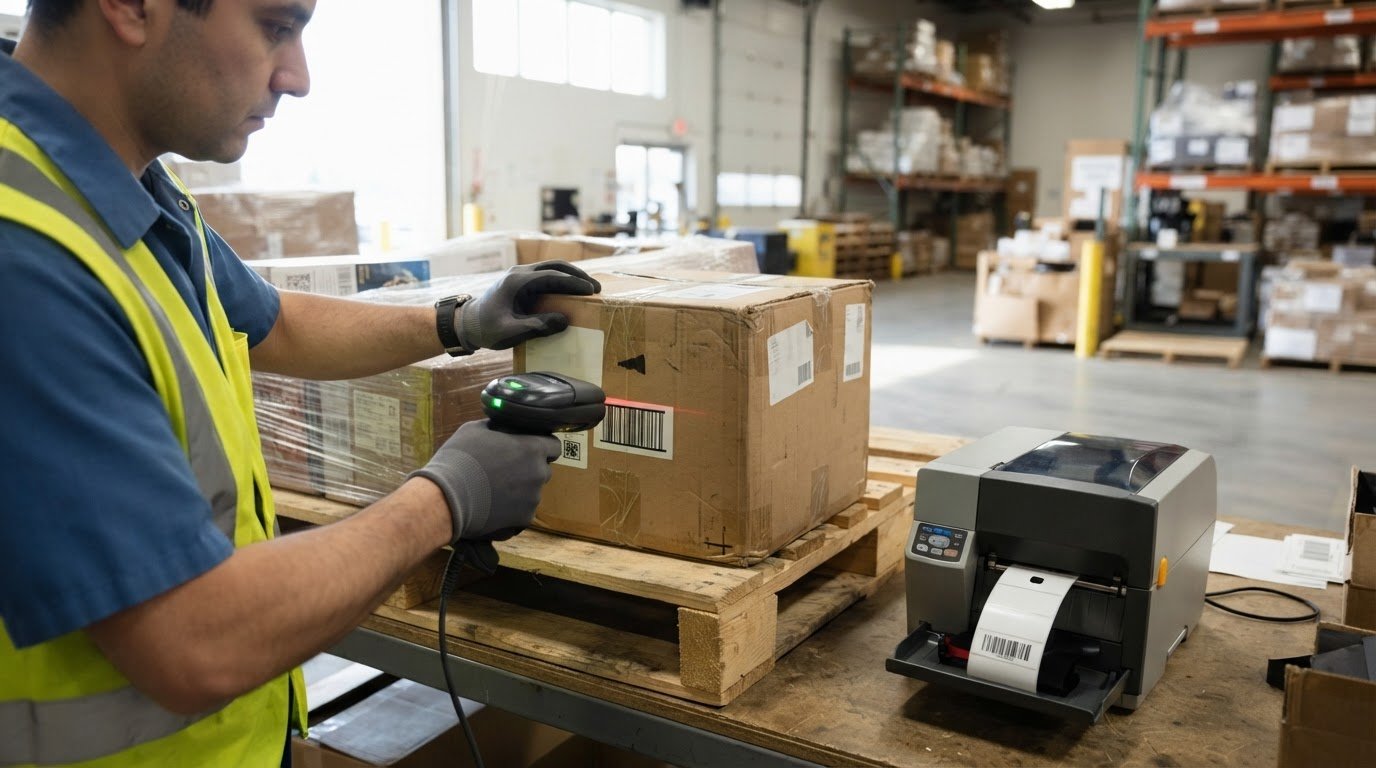
A barcode scan becomes useful when the WMS can interpret it as a warehouse transaction. By integrating barcode software with a WMS, a scan can connect an item or location to a record, then update inventory as goods are received, put away, picked, transferred or shipped. The workflow depends on clear barcode data and a reliable connection between the scanning device and the system.
It’s easy to think of scanning as simply replacing a clipboard. The bigger change is that each scan can help the WMS validate what happened and where, reducing reliance on manual updates. The right setup still needs to fit your warehouse processes, devices and existing systems.
This article explains how barcode inventory moves from a label scan to a WMS update, including how barcode software connects with warehouse and business systems. It also covers key implementation and cost factors, such as software, scanners, printers, labels and integration complexity, to help you understand what shapes a workable solution in Canada.
Key Takeaways
- Map each scan to a warehouse event, from receiving and putaway through picking and shipping, so inventory records reflect physical movement.
- Plan how barcode data will pass between scanners, software and the WMS, including how the system handles errors or interrupted connections.
- Estimate implementation needs by looking at system compatibility, workflow complexity, devices, printers, labels and staff training.
- Choose scanning and printing equipment to suit your warehouse processes and label requirements, rather than treating hardware as a separate decision.
- OptiMediaLabs Canada offers label printers, RFID label printers, cutters and finishers, and thermal transfer ribbons for warehouse labelling needs.
Aligning barcode systems with warehouse control systems
For Canadian operations, include privacy, security and tax data in WMS integration planning. Limit personal information in scan records, control access by role and protect data as it moves between devices and systems. Preserve the tax codes and transaction details configured in the finance system. A barcode scan should record a warehouse event, not replace tax rules.
Start by mapping each warehouse event to a WMS action. For example, a receiving scan can identify a product, compare its barcode with a purchase order, and record the quantity and destination bin. A putaway scan then links the product to a location. At picking, scanning both the location and item lets the warehouse management system validate the pick before shipment.
Use consistent identifiers across facilities. A barcode inventory setup should distinguish a product from its storage location, pallet or shipment, even when two warehouses stock the same SKU. The WMS can then associate each scan with the correct facility and bin. For example, transferring a carton from one location to another should reduce stock at the origin and add it at the destination.
That shared structure improves inventory visibility across a fulfilment network. A central view can show which warehouse holds an item and whether it is available, reserved or in transit. When an online order arrives, the system can use those records to select a fulfilment location. Clear transfer scans also help teams trace stock between facilities instead of treating each warehouse as an isolated inventory file.
Scanning can improve operational performance by replacing repeated typing with transaction validation. If an employee scans the wrong item or location, the WMS can flag the mismatch before the next step. During cycle counting, workers scan a location and its products; the system compares the physical count with the recorded balance and flags discrepancies for review.
Barcode technology can also connect warehouse activity with automation. A fixed-position scanner can capture a label as a carton passes a conveyor or dock point, while a handheld scanner supports mobile work in receiving or picking. In either case, the WMS needs the correct identifier and event. If a conveyor scan records a carton without its destination, the system may not route it correctly.
Define how each scan reaches the WMS, including the required data fields, validation response and exception path. Barcode software can help standardize label data and print formats; for example, barcode and label software can support consistent identifiers across products and locations. Test receiving, transfers and picking with representative items before applying the same workflow across multiple warehouses.
How does a barcode inventory system work end to end?
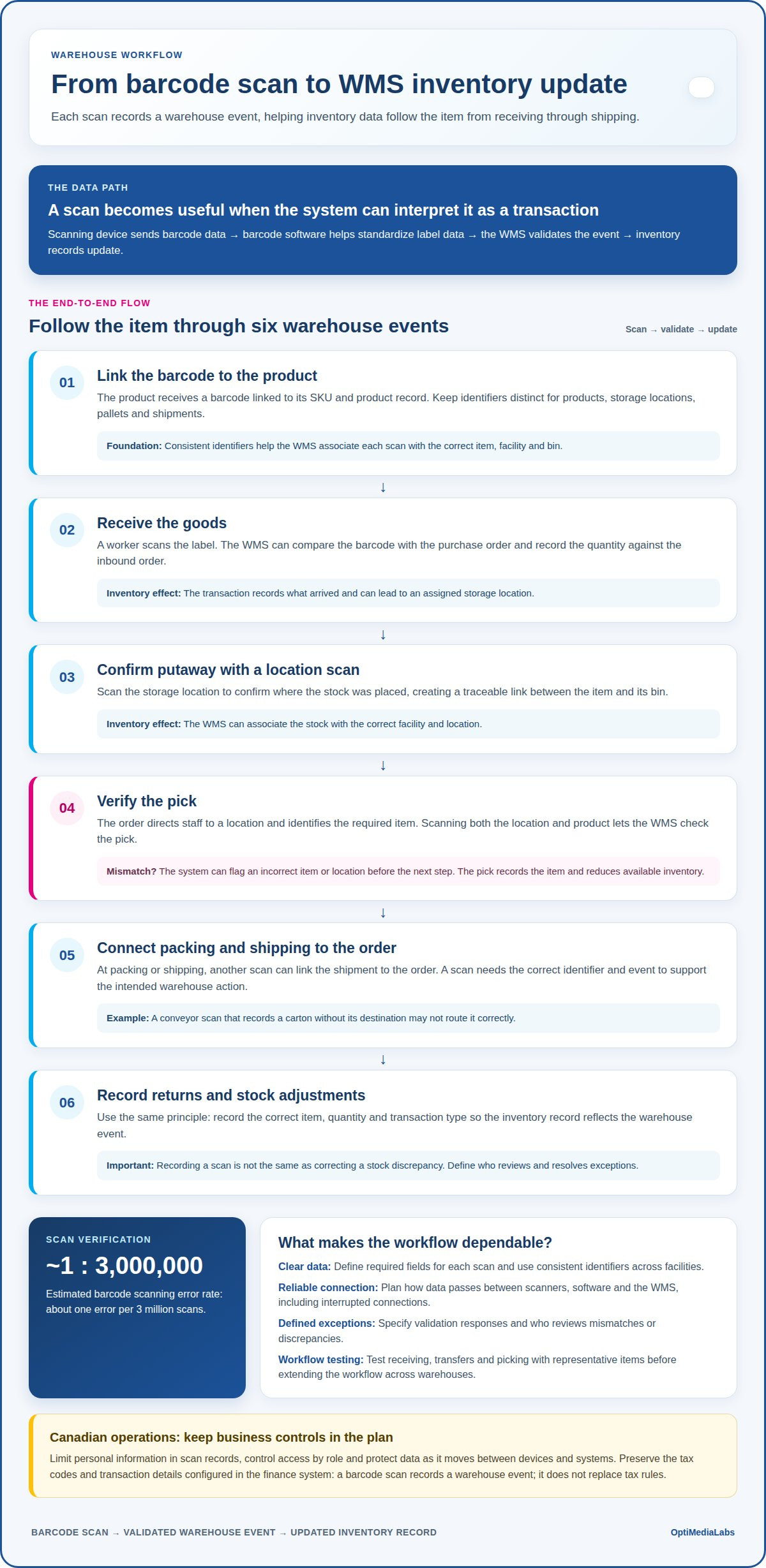
A barcode inventory workflow links product labels, scanning devices and inventory records. Each scan records a warehouse event, from receiving through order processing, so inventory data follows the item.
Real-Time Inventory Updates
Real-time inventory updates occur when a scan sends a transaction to the inventory system as the warehouse event happens. Receiving a case, moving it to a bin or picking it for an order can change its recorded status and quantity. This gives staff a current view for fulfilment decisions instead of making them wait for a later spreadsheet update.
Scan Verification and Inventory Accuracy
Scan verification checks the barcode against the product, location or task expected by the system. For example, during picking, a scan can identify a mismatch between the ordered SKU and the item in hand. Barcode scanning has an estimated error rate of about one error per 3 million scans, while verification also helps catch incorrect labels or process steps.
The workflow begins when a product receives a barcode linked to its SKU and product record. At receiving, a worker scans the label and records the quantity against the inbound order. The system can then assign a storage location. A location scan confirms where the stock was placed, creating a traceable link between the item and its bin.
During picking, the order directs staff to a location and identifies the required item. Scanning the location and product records the pick and reduces available inventory. At packing or shipping, another scan can link the shipment to the order. Returns and stock adjustments follow the same principle: record the correct item, quantity and transaction type.
Reorder points use inventory balances to indicate when stock may need replenishment. A system can compare available quantities with a threshold, while forecasting considers sales patterns and expected demand. For example, if a product sells faster during a seasonal promotion, historical movement can inform purchasing decisions. The forecast is only as useful as the accuracy of scans and timeliness of transaction records.
Choose inventory software based on the processes it must support, the data it needs to exchange and the operation’s expected scale. Consider current and projected SKU, warehouse and sales-channel counts over the next two to three years. Map receiving, picking, transfers, returns and cycle counts as well. A solution that handles today’s order flow but cannot support additional locations may require more integration work later.
Strong inventory accuracy improves order processing because available stock and picked quantities stay aligned. If a scan detects a mismatch, the system can route the exception for review before fulfilment proceeds. Recording a scan is not the same as correcting a stock discrepancy. Define who resolves exceptions and how the corrected quantity is recorded.
For help matching barcode software to inventory workflows, discuss your barcode system requirements.
Barcode software integration with existing systems
Integration connects barcode scanning and label data with the systems that manage orders, inventory and finance. A practical plan starts with existing workflows, then defines the data exchange, equipment and rollout checks.
System Assessment and Planning
System assessment maps the current process and identifies where each record must move. Trace a purchase order from receiving through storage, then note which system owns the SKU, quantity, location and order status. This matters because duplicate records or inconsistent item codes can create inaccurate updates. Include existing warehouse, accounting and e-commerce systems in the map, along with the people responsible for maintaining each record.
Integration Options and APIs
A built-in integration connects systems through a supported connector; an API exchanges data between applications through defined requests. Barcode software and WMS platforms may offer either option, depending on the products and versions in use. The fit depends on supported data fields, authentication, transaction timing and error handling. For example, confirm that a receiving scan can send the SKU, quantity and purchase-order reference the WMS expects.
Hardware, Network, and Database Requirements
Requirements depend on the scanner type, label printer, warehouse network and database used by existing systems. Handheld devices need a connection that can transmit scans from work areas; printers need compatible label formats and access to barcode software. The database must store matching identifiers and transaction records. For example, test whether a scan can resolve a SKU and location without relying on inconsistent descriptions.
Configuration, Testing, and Rollout
Configuration maps barcode fields to WMS records and sets rules for valid transactions. Test representative receiving, picking, counting and adjustment scenarios before rollout. Include wrong-item scans, duplicate submissions and interrupted connections. Common issues include mismatched SKU formats, unavailable network connections and rejected data fields. Troubleshoot by checking the scan, field mapping and system response in sequence.
Costs depend on integration complexity, software configuration, hardware compatibility, label changes, testing and staff training. A system using an existing connector may require different work from one needing custom data exchange. Include ongoing support and maintenance in the estimate, not just initial setup. Barcode labels and printing supplies also affect operating costs as workflows and product ranges change.
Estimate return on investment by comparing implementation and operating costs with measurable process changes. Track receiving time, manual data entry, counting effort, picking errors and inventory adjustments before rollout. After launch, compare the same measures across equivalent workflows. This shows where scanning reduces rework or improves record accuracy, while separating integration benefits from changes in order volume or staffing.
Software pricing and implementation costs
A barcode project budget includes more than software. Separate recurring licence or subscription costs from implementation, hardware, labels, training and ongoing support. For example, a warehouse adding barcode scanning to an existing WMS may have different needs from one connecting several management systems. Key cost drivers include the number of workflows, devices, locations and data exchanges involved.
Software pricing can depend on how access is licensed, which features are required and how the system connects with the warehouse management system. Include configuration and integration work in the estimate, especially if product records or transaction fields need mapping. Implementation planning should also account for testing and staff training. A clear scope helps distinguish one-time setup work from recurring software and support costs.
Hardware costs depend on the scanning method, operating environment and number of work areas. A mobile device used for receiving may not suit a fixed scanning point on a conveyor. Printer requirements also vary with label size, material, print volume and whether the workflow uses thermal transfer. Estimate printer and supply choices against actual warehouse tasks. Thermal transfer label printers are one option for workflows that use this printing method.
Labels and ribbons are ongoing operating costs. Consumption depends on the number of items, locations or shipments that need identification. For example, a warehouse that prints a label for each outbound carton uses supplies differently from one that labels reusable bins. A QR code may hold more information than a linear barcode, but the choice should reflect scanning distance, label space and the data the WMS needs.
Labour costs include time spent receiving, counting, correcting errors and maintaining records. Compare the current process with the planned barcode workflow: manual asset tracking may require staff to reconcile equipment records, while scan-based updates can record an asset’s movement and assigned location. Include time for exception handling, since a damaged label or unmatched record still needs review.
Estimate return on investment by tracking baseline measures before rollout, then comparing equivalent work afterwards. Useful measures include labour hours for counting, time spent correcting inventory records, order processing delays and asset searches. Consider demand changes too: a seasonal increase in shipments can affect both labour and label consumption. Separate these volume effects from changes directly associated with barcode scanning.
Review the estimate as a complete operating picture. List software, integration, devices, printers, labels, ribbons, training and support, then identify which costs recur. This makes it easier to understand how implementation choices affect warehouse spending without confusing equipment costs with ongoing management system costs.
Integrating barcode software with a WMS
Integrating barcode software with a WMS means defining how each scan becomes a warehouse transaction. The key is not simply connecting devices. It’s ensuring the WMS receives the correct item, location, quantity and event for each operation.
Barcode-to-WMS integration should support the data fields and workflows staff need across receiving, picking, transfers, returns and adjustments. A receiving transaction, for example, may include a SKU, quantity, purchase-order reference, warehouse location and scan time. The WMS uses those fields to record the event against the correct inventory record.
Start by matching each barcode identifier to a WMS record. An item barcode should resolve to the intended SKU, while a location label should point to a valid bin or storage area. For a pallet transfer, the workflow may need to record the pallet identifier, source location, destination location and transfer status. These relationships let warehouse operations trace stock without relying on manual notes.
Next, define what each scan permits. A picking scan might validate the item and location against an assigned order. A return scan may require a reason or condition before inventory becomes available again. For retail distribution, an order may also carry a channel or shipment reference. Clear transaction rules help the WMS distinguish an inventory movement from an order update.
Plan how the software handles incomplete or repeated scans. If a device loses its connection after recording a pick, the system needs a clear response when it reconnects. For example, it should identify whether the transaction was accepted before sending it again. Otherwise, a repeated scan could create duplicate activity or leave staff unsure whether the item moved in the records.
Device behaviour matters too. Handheld scanners or mobile computers may send decoded barcode data through Bluetooth or radio frequencies. The integration must map that input to the fields expected by the WMS. Test the full path with actual warehouse tasks, including a valid scan, an incorrect item and an unavailable location. Each test should produce a recognizable system response.
For an operation with several facilities, include a warehouse identifier in transactions where the WMS needs it. That helps distinguish identical SKUs stored at different locations and keeps transfers associated with the correct site. Barcode labels should also use identifiers that remain consistent across connected systems, rather than descriptions that staff may enter differently.
The practical takeaway: specify the scan, fields, validation and exception response for each workflow before rollout. To discuss barcode software and warehouse requirements, plan your barcode-to-WMS integration.
OptiMediaLabs Canada
OptiMediaLabs Canada helps businesses consider the printing equipment and supplies that support barcode workflows. When an integration plan calls for on-demand product or location labels, printer choice and ribbon compatibility can affect day-to-day use. The right setup depends on the label format, print volume and warehouse environment.
OptiMediaLabs Canada offers Afinia Color Label Printers, RFID Label Printers, Afinia Label Cutters & Finishers and Thermal Transfer Ribbons. These options can support different identification and printing needs alongside your barcode and WMS decisions. Bring your workflow requirements into the equipment discussion, including where labels will be used and how they must be printed.
Contact OptiMediaLabs Canada to discuss your warehouse labelling requirements.
Make the Next Integration Decision with Confidence
Treat the warehouse workflow as an evolving system, not a one-time connection. As products, order channels or facilities change, the integration should still support accurate transactions and clear ownership of inventory data. Plan for those changes early, so future updates can build on a defined process rather than introduce disconnected workarounds.
That’s the long-term value of integrating barcode software with a WMS: scans become part of a consistent operating process that can adapt as warehouse needs shift. Keep the next decision practical. Identify the workflow that needs attention first, the information it must exchange and the equipment that supports it.
For a focused discussion about your warehouse requirements and barcode setup, contact OptiMediaLabs Canada to discuss your project. A clear starting point can help you move forward with confidence.
Frequently Asked Questions
How does barcode software integrate with a WMS?
Barcode software decodes a label scan and passes the data to the WMS through a supported connection. The WMS matches the data to its records and applies the relevant transaction. For example, a scan may identify a returned item, while a return code records why it came back. The systems need agreed data fields and transaction rules so each scan is interpreted correctly.
What barcode formats and scanners are compatible with WMS platforms?
Compatibility depends on whether the barcode software can read the format and the WMS can match its decoded value to a record. Common formats include Code 39, Code 128, UPC and QR codes. Scanners may be handheld devices, mobile devices with camera scanning, or fixed-position readers. Confirm that the chosen setup reads the labels used in your workflow and sends the expected data to the WMS.
What are the steps to integrate barcode software with a WMS?
Begin by identifying the warehouse transactions and records involved. Then map barcode values to WMS fields, select the connection method, configure transaction rules and test with representative records. Include exceptions, such as a damaged label or an unknown SKU. After resolving test issues, introduce the workflow in a controlled rollout and monitor whether scans create the intended WMS records.
What does barcode software and WMS integration cost in Canada?
Canadian integration costs depend on software licensing, connection complexity, configuration, hardware, labels, training and support. A setup using an existing integration may need less custom development than one connecting older or incompatible systems. Build the estimate in Canadian dollars and separate one-time implementation expenses from recurring costs. Include any required changes to printers, scanners or label formats in the project scope.
How long does a barcode software and WMS integration take?
Small-business barcode system deployments typically take 2-8 weeks, depending on complexity. The schedule can change with the number of workflows, data fields, devices and systems involved. Testing and staff training also take time, especially if receiving and picking use different rules. A project plan should include configuration, test transactions, issue resolution and rollout rather than counting only the software connection work.
How can a business test and measure a barcode-WMS integration before rollout?
Test with representative products, locations and transactions in a controlled environment before changing live workflows. Include successful scans, invalid identifiers, duplicate submissions and interrupted connections. Compare each scan with the resulting WMS record. Measure outcomes using process-specific indicators, such as transaction completion, correction work and staff handling time. Review exceptions with warehouse staff, then adjust mappings or instructions before rollout.