
BarTender vs Teklynx Codesoft: Compare Licensing and Fit
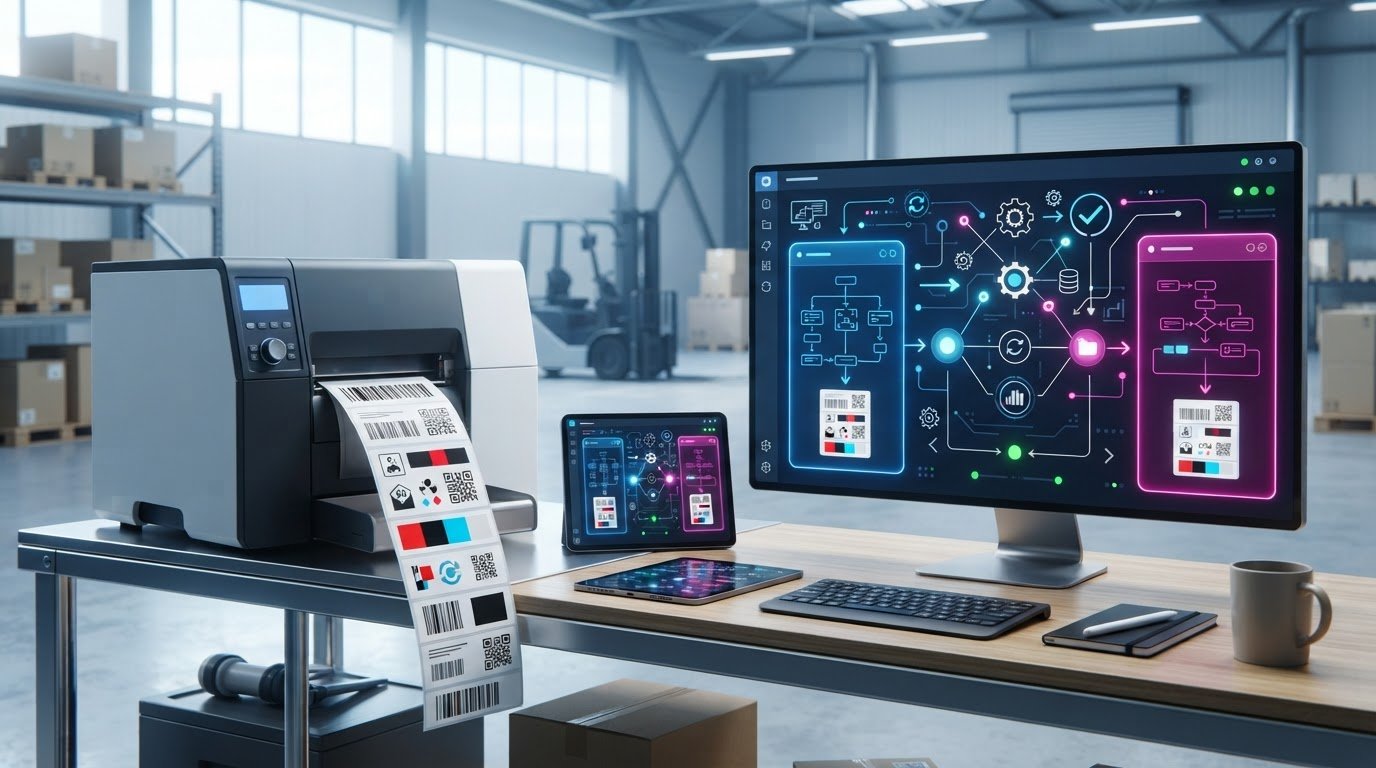
Neither option is automatically the better fit: a BarTender vs. TEKLYNX CODESOFT barcode generator software decision depends on how each matches your data connections, licensing needs and day-to-day labelling work. The right choice is the one that suits your operation, not simply the one with the broader feature list.
It’s reasonable to expect a clear winner when comparing software for a business workflow. But licensing models, organization size and operational requirements can all affect which solution makes sense for a Canadian business.
This comparison covers data connectivity, licensing, business size, operational fit and user ratings to help you assess the trade-offs. Use the practical checks below to compare each option against your labelling workflow.
Key Takeaways
- Map your label data sources and workflow requirements before comparing how each platform handles data-driven labels.
- Assess hosting and licensing against how your team needs to access and manage the software.
- Compare the platforms by operational complexity and business needs, not business size alone.
- Use user ratings as one input alongside practical fit for your labelling tasks.
- Turn the comparison into a decision by ranking your must-have capabilities and matching them to your operation.
Database connectivity and data-driven labels
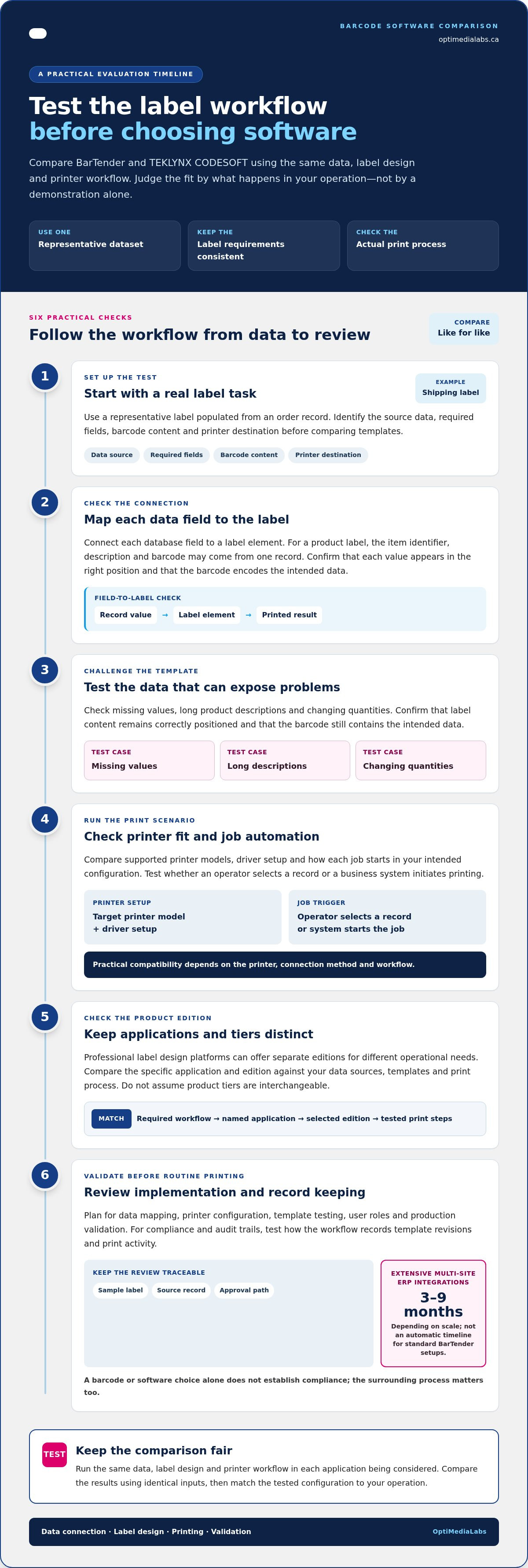
BarTender and alternative barcode generator software options are both used for database-driven labelling, but the best test is your actual workflow. Start with a representative label, such as a shipping label populated from an order record. Identify the data source, required fields, barcode content and printer destination before comparing templates. This shows whether the design fits the task, not just whether it looks familiar in a demonstration.
To assess printing, compatibility and automation, compare supported printer models, driver setup and how each job is triggered in your intended configuration. Both applications are utilised for label printing, but practical compatibility depends on the printer, connection method and workflow. Automation also depends on how a job receives data and starts, whether an operator selects a record or a business system initiates printing. Test these steps with a representative printer and dataset.
Data-driven label design involves more than connecting to a database. Map each field to a label element, then test missing values, long product descriptions and changing quantities. For example, a product label might combine an item identifier, description and barcode from one record. Confirm that each value prints in the right position and that the barcode encodes the intended data. This can reveal template and mapping problems before routine printing.
Professional label design platforms often offer separate software editions for different operational needs. Compare the specific application and edition with your required data sources, templates and print process. Do not treat the product tiers as interchangeable: document which application your workflow requires, then test the same sample label through the design and printing steps.
Implementation planning should include data mapping, printer configuration, template testing, user roles and production validation. Complex enterprise resource planning integrations can take three to nine months depending on scale. That timeline applies to extensive multi-site deployments, not automatically to standard BarTender setups. For cloud-based workflows, cloud software is another product context to distinguish from this comparison when working with OptiMediaLabs Canada.
Compliance and audit trails depend on the process around the software as well as the software's features. List required label fields, approval steps and change records, then test how each workflow records template revisions and print activity. A barcode or software choice alone does not establish compliance. Keep a sample label, its source record and its approval path together for review.
| Option | Data and label design | Printing and automation | Evaluation focus |
|---|---|---|---|
| BarTender | Test your database fields and label templates. | Test the target printer and job trigger. | Match configuration to your workflow. |
| Primary Software Choice | Test the same data and label design. | Run the same printer and automation scenario. | Compare results using identical inputs. |
| Alternative Edition | Evaluate as a separate label design option. | Confirm fit with your planned print process. | Keep application requirements distinct. |
Choose by testing the same data, label design and printer workflow in each application you are considering.
Hosting and licensing options
Compare BarTender and TEKLYNX CODESOFT by deployment requirements and licence structure, not product name alone. First, identify where label files and connected data need to reside: on a workstation, within a local network or in a hosted environment. Then compare that setup with the specific product edition under consideration. Hosting affects access, administration and how printing integrates with existing systems.
Licensing should reflect how the software will actually be used. Record who designs templates, who prints labels, which printers need access and whether teams work across locations. Find out how each edition defines licensed use, handles additional users or printers, and accommodates operational changes. The applicable terms depend on the selected edition and agreement, so compare them rather than assuming they are equivalent.
How do you migrate label templates and printer settings between BarTender and CODESOFT? Treat migration as a controlled rebuild unless the selected software provides a compatible conversion path. Catalogue templates, data sources, printer models, media settings and print triggers. Then recreate and test each critical workflow in the destination application before switching production.
Use a test set that includes a routine product label, a shipping label and any template with conditional fields. Compare the original and recreated versions for text placement, barcode data, print dimensions and printer behaviour. Keep the original files and document changes so staff can trace which template replaced each one. This makes migration gaps visible without assuming one vendor’s files transfer unchanged.
For a NiceLabel migration, inventory the templates, printer configurations, connected data and user procedures. Group files by workflow, then identify which need to be recreated in BarTender or CODESOFT. Run sample prints on the intended printers and record the approved results. This gives the team a practical migration plan without assuming direct conversion between software formats.
Evaluate support and training against the tasks staff actually perform. List the help needed for installation, template changes, printer setup and troubleshooting. Compare the support channels and training materials included with the specific purchase, then decide who will maintain templates and train new operators. An enterprise environment may also need a documented escalation path and an internal software owner.
- Hosting: identify where software, label files and data must be accessed.
- Licensing: map users, printers, locations and design responsibilities.
- Migration: inventory files, rebuild workflows and validate sample prints.
- Support: assign training, maintenance and issue ownership.
Use these requirements to compare editions and plan a managed transition. For guidance matching barcode software to your workflow, contact the team about your software needs.
Supported business sizes
Business size alone won’t determine whether BarTender or TEKLYNX CODESOFT is the right fit. Compare the complexity of your labelling operation instead: template ownership, printer deployment, data sources, approval steps and operator access. A small team working across several locations may need centralized control, while a larger site may prioritize consistent templates across departments. Map these requirements before choosing an application.
For a smaller business, start with the daily workflow. Identify who creates labels, who approves changes and who runs print jobs. A local manufacturer producing product and shipping labels may prioritize straightforward template maintenance and a dependable printer workflow. If the company is growing, consider whether the selected edition and licence structure can accommodate new users, printers, locations or connected systems.
An enterprise operation should assess governance across sites, not just label volume. Document which teams can edit templates, how changes are approved and how production teams access current files. Then test a shared workflow using a central template and a remote printing location. Evaluate BarTender and CODESOFT against that same scenario, including the records needed for compliance reviews.
Assess platform compatibility separately. Record the operating systems, servers, workstations and printer connections in your environment, then compare them with the requirements for the exact BarTender or CODESOFT edition under consideration. Include the systems that maintain label data. Compatibility on a designer’s workstation alone does not establish that the complete printing workflow will work.
API support matters when software needs to connect with an order, inventory or manufacturing system. Specify the event that should create a label, the data the system must pass and the response it needs after printing. Then assess whether the relevant product edition and integration method support that workflow. “API support” is not a single, universal capability: the required interface and use case matter.
TEKLYNX customer support is another comparison factor. Define the help your team needs, such as installation guidance, troubleshooting or assistance with a production change. Compare the support channels and coverage associated with the CODESOFT purchase with BarTender’s applicable support arrangements. Assign an internal owner who can maintain templates and gather the details needed when an issue arises.
- Small operation: prioritize manageable template creation and routine printing.
- Growing team: assess how users, printers and locations fit the licence.
- Enterprise: test governance, platform compatibility and integration requirements.
- Any business size: compare support needs with the actual workflow.
Choose the product and edition that meet your platform, integration, support and compliance requirements with the least operational friction.
Choosing software by operation size and needs
Choose BarTender or TEKLYNX CODESOFT based on the work your operation must complete, not headcount alone. A single-site producer may need a small set of repeatable templates, while a multi-site manufacturer may need consistent label control across departments. Describe the workflow first: who creates each template, who approves changes and who prints the labels.
Start with a representative label, such as a product identifier used at receiving and shipping. Record its required fields, barcode content, print destination and approval owner. Then map how it changes when an item, order or supplier changes. This gives your team a real task for the BarTender vs Teklynx Codesoft barcode generator software comparison, rather than a generic feature checklist.
Separate essential requirements from preferences. Essentials might include a specific data connection, supported printer or controlled template access. Preferences could include a familiar design interface or file organization. Apply the same requirements to BarTender and CODESOFT, and note how well each supports the workflow without adding unnecessary steps.
Consider how often templates change. A stable operation may prioritize straightforward maintenance of approved designs. A business that frequently adds products may value clear template ownership, review procedures and staff training. For example, compare how an authorized editor updates a product label and how an operator prints using the current version.
Production interruptions matter, too. Identify labels that keep receiving, packing or dispatch moving, then define a workaround for issues with a template, printer connection or data feed. Use this scenario to assess internal ownership and the process for resuming work. The right fit should suit how staff can operate and maintain the software.
Have the people who design, approve and print labels review the same scenarios in both applications. Record practical observations, including extra workflow steps, unclear hand-offs, data-entry risks and maintenance tasks. This focused BarTender vs Teklynx Codesoft barcode generator software evaluation helps decision-makers weigh trade-offs without letting one department’s preference dominate.
- For a focused operation: prioritize core label workflows and manageable template maintenance.
- For a growing operation: assess how product changes, staff roles and printer needs affect daily work.
- For a multi-site operation: examine template governance, approval ownership and consistent use across locations.
Before selecting a platform, write an acceptance checklist based on these scenarios. Include the label output, people involved, required data and approval process. Compare BarTender and CODESOFT against these operating needs, not assumptions about which product suits a particular business size.
User ratings
User ratings can help compare BarTender and TEKLYNX CODESOFT, but a single score won’t show which software fits your workflow. Read reviews for the specific product and edition under consideration. Separate comments about label design, printer setup, data connections and support, since each reflects a different part of daily use.
Check the review date and product version before treating feedback as relevant. A review of an older BarTender release may describe a different interface or workflow from the edition under consideration. Apply the same test to CODESOFT reviews. Note the reviewer’s task, such as editing templates or managing label printing, so the feedback relates to your team’s actual work.
Look for repeated, specific observations rather than broad praise or criticism. For example, a comment about maintaining shared templates is more useful to a multi-site team than a general statement about ease of use. A report about database connections matters most if your operation uses similar data. Compare like with like: product edition, business use and operating environment.
Ratings also reflect different user roles. A designer may value flexible template creation, while a production operator may focus on selecting a record and printing correctly. An administrator may care about permissions and deployment. When reading reviews of BarTender or CODESOFT, note who is speaking and whether their responsibilities resemble those of the people who will use the software in your organization.
Use ratings to create a shortlist, then test both products against a fixed task. Ask a designer, an operator and a software owner to complete the same workflow in each application. Have them create or update a template, print a representative label and record any obstacles. This practical comparison adds context that star scores cannot provide.
- Relevance: match each review to the product edition and task.
- Specificity: prioritize comments describing a real workflow.
- Balance: compare feedback from designers, operators and administrators.
- Validation: test the same labelling task in BarTender and CODESOFT.
Build a simple evaluation sheet with criteria your team can observe, such as task completion, template clarity, printer setup and support experience. Apply the same criteria to both applications. Keep reviewer opinions separate from your test results, then weigh each against your operation’s priorities. This prevents a popular rating from outweighing a capability your team needs.
For help matching barcode software to your labelling workflow, discuss your software requirements.
OptiMediaLabs Canada: Afinia Color Label Printers
OptiMediaLabs Canada offers Afinia Color Label Printers for businesses evaluating the hardware side of label production. After comparing BarTender and CODESOFT, consider how your printer needs fit the planned workflow, including whether colour labels or RFID printing are part of the operation.
OptiMediaLabs Canada also offers RFID Label Printers, Afinia Label Cutters & Finishers and Thermal Transfer Ribbons. These products are relevant when your requirements extend beyond software selection to printing equipment, label finishing or ribbon supplies. Match each need to your production setup and intended label materials.
For information about these options, contact OptiMediaLabs Canada or visit optimedialabs.ca.
Turn your software choice into a production plan
A useful BarTender vs. TEKLYNX CODESOFT barcode generator software comparison should lead to a practical next step: align your software decision with the equipment and supplies your label workflow requires. Consider the complete production setup, from the selected printer to the consumables used to produce your labels.
OptiMediaLabs Canada offers Afinia Color Label Printers, RFID Label Printers and Epson Ink Cartridges. These offerings may be relevant as you plan colour or RFID label production and the supplies needed for your printer setup. Match your requirements to the products involved, then bring those details into your purchasing decision.
Ready to discuss your label production requirements? Contact OptiMediaLabs Canada to take the next step with a clearer plan.
Frequently Asked Questions
What editions and licensing options are available for BarTender and CODESOFT?
BarTender and CODESOFT licensing depends on the selected product edition and deployment arrangement. Compare the current editions by documenting who needs design access, which printers require access, and whether the software runs locally or across a network. Then review the licence entitlements for those use cases, including how changes to users or printers are handled. This helps identify a suitable option without assuming the products use equivalent licence structures.
What are the system requirements and supported operating systems for BarTender and CODESOFT?
System requirements vary by product version, edition and deployment setup, so assess the complete workflow, not just a designer’s computer. Record the operating systems on each workstation or server involved, as well as the database and printer connections your team uses. Compare these details with the requirements for the exact BarTender or CODESOFT release under consideration. Include computers used for template editing, administration and production printing.
What are common drawbacks, limitations, and user reviews of BarTender and CODESOFT?
Potential drawbacks depend on how each product fits your workflow, so treat reviews as clues rather than universal verdicts. Look for specific reports about tasks your team performs, such as editing a complex template or maintaining printer settings. Note the product version and reviewer’s role, then test those tasks directly. A complaint about an unfamiliar interface may matter less than a limitation affecting a production-critical label.
What are the key differences between BarTender and TEKLYNX CODESOFT barcode label software?
The comparison does not point to a feature-based winner. Compare the editions against your data sources, printer workflow, hosting, licensing, user access and operational complexity, then test both with the same label and printing scenario.