
Industrial Barcode Printers: Compare Warehouse Printer Options
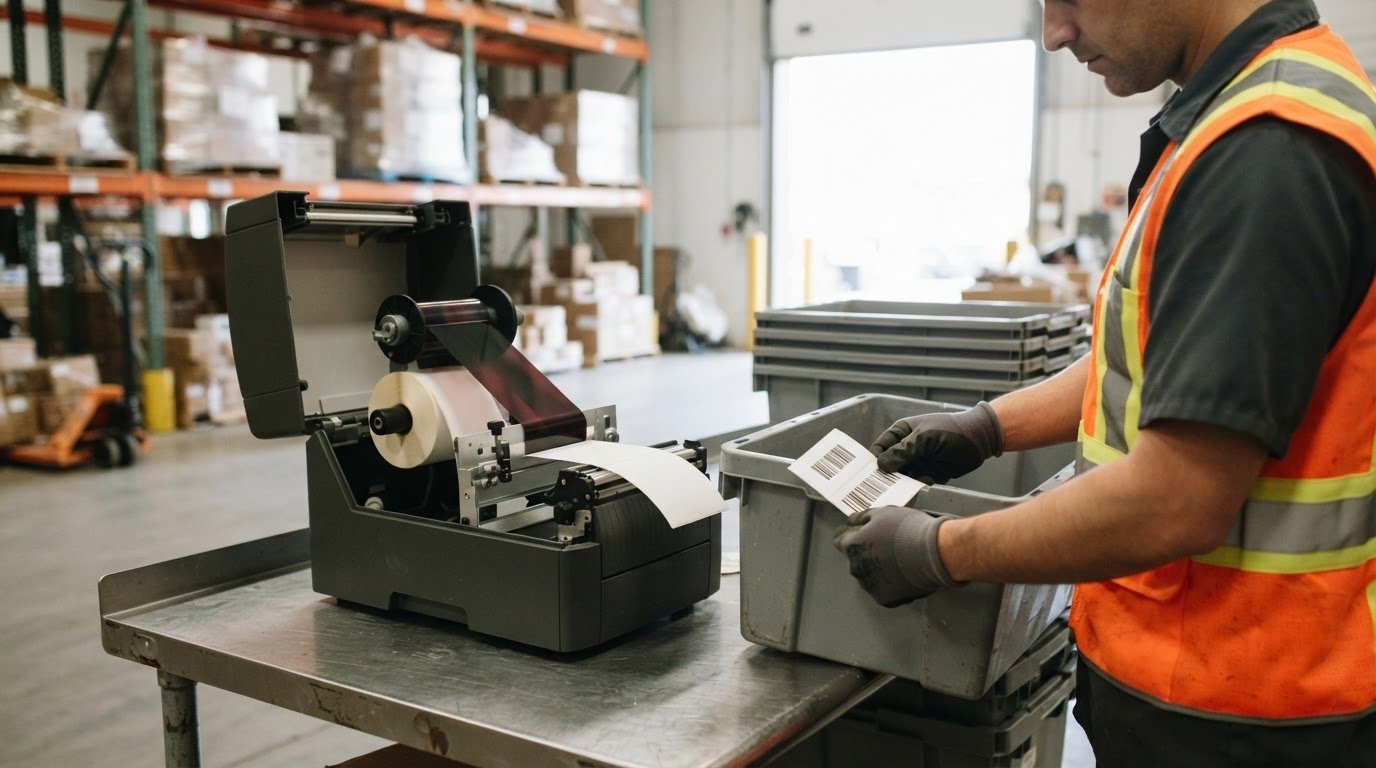
The right warehouse label depends on how long it needs to remain readable. Direct thermal suits short-life shipping labels that are scanned once and discarded, while thermal transfer is generally preferred when labels need greater durability or longer readability. Choosing industrial barcode printers for warehouse operations starts with matching the print method to the label’s purpose and conditions.
That choice matters in a busy warehouse, where labels support shipping, inventory, pallets and tracking. A printer also needs to suit the workload, label sizes, workspace and software connections, not merely produce a clear barcode.
This guide compares direct thermal and thermal transfer, as well as desktop, industrial, mobile and colour printer options. You’ll learn what to consider for warehouse conditions, how to match printer capacity and features to your operation, and what affects the cost of industrial thermal transfer printers in Canada.
Key Takeaways
- Match the print method to label lifespan: direct thermal suits short-life shipping labels, while thermal transfer is generally preferred for labels that need to last longer.
- A 4-inch print width covers many shipping and bin labels; larger pallet or compliance labels may call for a 6- to 8-inch printer.
- Compare USB, Ethernet and wireless connectivity alongside compatibility with your warehouse management system and label formats.
- Print resolution affects barcode detail: 203 dpi suits many standard warehouse applications, while dense labels may need higher resolution.
- Assess daily volume, duty cycle, media capacity and warehouse conditions to decide whether a desktop or industrial printer is the better fit.
Should a warehouse use direct thermal or thermal transfer labels?
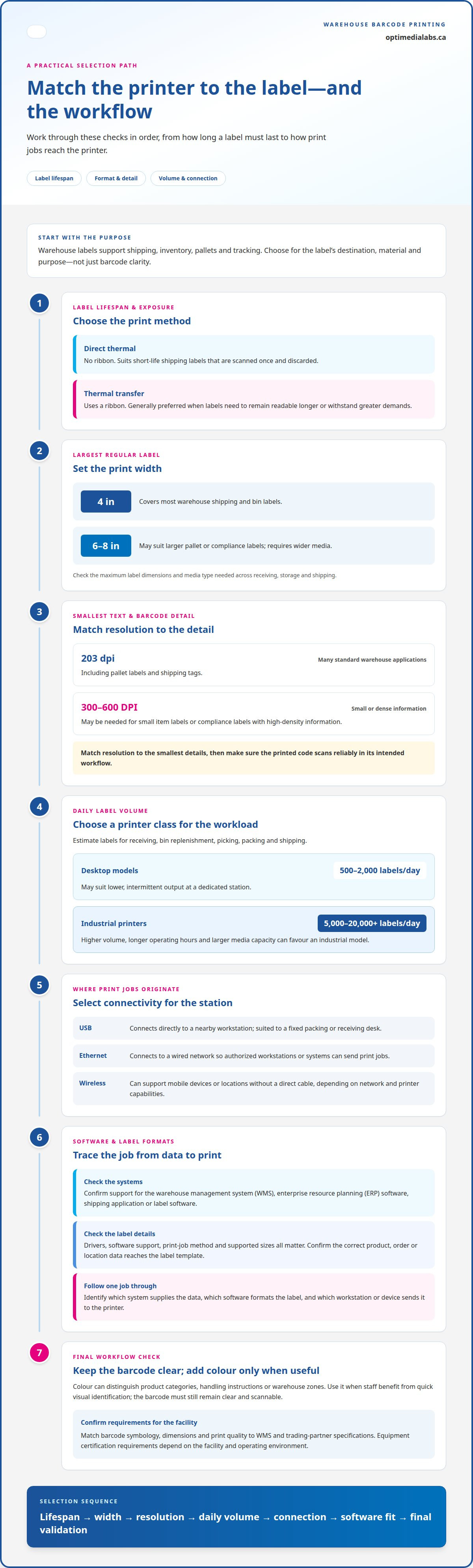
Choose the print method according to label lifespan and exposure. Direct thermal labels need no ribbon and suit short-life shipping labels scanned once and discarded. Thermal transfer uses a ribbon and is generally preferred when labels must remain readable longer or withstand greater demands. Consider the label’s destination, material and purpose before selecting a printer.
Print width should match the largest regular label, not just the smallest barcode label. A standard 4-inch printer covers most warehouse shipping and bin labels. Pallet labels or large compliance labels may suit a 6- to 8-inch print width. Confirm that the printer can handle the label dimensions and media type used across receiving, storage and shipping.
| Option | Typical fit | Key consideration |
|---|---|---|
| Direct thermal | Short-life shipping labels | No ribbon; labels are best for brief use |
| Thermal transfer | Longer-lasting inventory or pallet labels | Uses ribbon; supports greater label durability |
| 4-inch printer | Most shipping and bin labels | Check the maximum label width needed |
| 6- to 8-inch printer | Large pallet or compliance labels | Requires wider media |
| Colour printer | Colour-coded identification | Useful for visual distinctions alongside barcodes |
Resolution also affects the result. A 203 dpi printer can handle many standard warehouse barcode applications, including pallet labels and shipping tags. Small item labels or compliance labels with high-density information may need 300 to 600 DPI. Match resolution to the smallest text and barcode details, then ensure the printed code scans reliably within the intended workflow.
Estimate daily label volume by task: receiving, bin replenishment, picking, packing and shipping. Industrial printers are listed for 5,000 to 20,000 or more labels per day, while desktop models are listed for 500 to 2,000 labels per day. Higher volume, longer operating hours and larger media capacity can favour an industrial model. Lower, intermittent output at a dedicated station may suit desktop equipment.
Colour label printers can help distinguish product categories, handling instructions or warehouse zones. Colour adds visual information, while the barcode must still remain clear and scannable. Use colour when staff benefit from quick visual identification, rather than adding it when monochrome barcode labels already suit the workflow.
For Canadian warehouse use, match barcode symbology, dimensions and print quality to warehouse management system and trading-partner specifications. Any equipment certification requirements depend on the facility and operating environment.
Choose the print method, width and printer class by weighing label lifespan, maximum format, daily volume and warehouse management needs, including Ethernet connectivity where required.
What are the best barcode label printers for warehouse operations?
The right fit depends on how print jobs reach the printer and how warehouse software creates each label. Compare connectivity, system compatibility, label formats and where staff need to print.
Ethernet, USB and wireless connectivity
USB connects a printer directly to a nearby workstation, making it suitable for a fixed packing or receiving desk. Ethernet connects it to a wired network, allowing authorized workstations or systems to send print jobs. Wireless connectivity can support printing from mobile devices or locations without a direct cable, depending on the warehouse network and printer capabilities.
Each option serves a different workflow. A dedicated station may work well over USB, while networked stations can use Ethernet. Wireless can support flexible placement, but the printer, network, software and devices must work together. Choose based on where label jobs originate, not on the connection list alone.
Software integration and label formats
Warehouse printers may need to communicate with a warehouse management system (WMS), enterprise resource planning (ERP) software, shipping applications or label software. A printer’s connection alone does not ensure integration. Drivers, software support and the method used to send print jobs also matter.
Check that the workflow passes the correct product, order or location data into a label template. Then compare the printer’s supported label sizes with the formats used for cartons, storage bins and pallets. A format suited to shipping labels at one workstation may not fit a larger pallet label.
Which barcode printer brands and models support common warehouse systems and label formats? Compatibility depends on the specific model, available connections, software support and required label dimensions, not brand name alone. Match those details to the WMS, ERP or shipping application that generates the job.
For a connected warehouse, trace a label job from its source to the printed result. For example, a WMS may create a picking label from an order record, while a shipping application produces a carton label. Identify which system supplies the data, which software formats the label, and which workstation or device sends the job to the printer.
Use this practical comparison before choosing:
- USB: Best suited to a printer assigned to one nearby computer.
- Ethernet: Suited to a fixed printer shared through a wired network.
- Wireless: Consider for workflows that send jobs from compatible mobile devices.
- WMS or shipping software: Confirm the complete data-to-print workflow and required label formats.
Test a representative job with actual warehouse data and the intended label format. Confirm that the printed content, barcode and destination match the system record. This can reveal workflow mismatches before deploying the printer across receiving, storage or shipping.
For help aligning printer connectivity and software requirements, discuss your warehouse printing needs.
What are current prices for industrial thermal transfer barcode printers in Canada?
Industrial thermal transfer printer pricing in Canada depends on configuration and workload. Print speed, resolution, media capacity, connectivity and operating requirements all affect which model fits. Compare complete configurations for the same tasks instead of judging a printer by speed or purchase price alone.
Start with daily output and the print station’s role. An industrial printer rated for 6 to 14 inches per second can suit higher-volume work, but the required speed depends on label size, job frequency and workflow. A printer producing shipping labels at a fixed packing station may have different needs from one serving receiving and pallet identification.
Resolution affects barcode detail. A 203 dpi printhead can handle many standard warehouse barcode applications. Small item labels or compliance labels with high-density information may require 300 to 600 DPI. Higher resolution can matter when a label must fit small text and dense barcode elements, while standard carton labels may not need that level of detail.
Assess media and system requirements alongside those factors. Thermal transfer printers use a ribbon, so the configuration must suit the label material and ribbon. The printer also needs to accommodate the required label width and work with the software and connectivity in the workflow. These factors affect the appropriate model and its operating requirements.
Before comparing configurations, prepare a short specification for actual warehouse jobs:
- Print speed: Compare the listed inches per second with the pace of the station.
- Resolution: Match 203 dpi to standard labels or consider 300 to 600 DPI for dense information.
- Label format: Include the largest and smallest formats used for cartons, products or compliance information.
- Workflow: Record the software, connection type and daily volume expected at each station.
Then test a sample label using the intended material, ribbon, print settings and barcode scanner. Check that small text remains legible and that the barcode scans after printing. This practical comparison helps establish whether added resolution or speed addresses a real warehouse requirement.
For a Canada-based purchase comparison, evaluate each printer against the same label jobs and operating needs. A configuration for high-volume printing, dense labels and demanding environments can differ substantially from a desktop setup for occasional shipping labels. Match specifications to actual use before comparing the available configurations.
Thermal transfer versus direct thermal printing
Compare the two methods by their consumables, label requirements and the work involved at each print station. In a warehouse workflow, the right choice depends on more than the printer’s output.
Direct thermal printing
Direct thermal printing forms an image on heat-sensitive label material without a ribbon. This removes ribbon selection and replacement from the workflow, which can simplify routine supply handling. For example, a shipping station producing labels for parcels that leave the facility quickly may value straightforward media changes over long-term label durability.
Thermal transfer printing
Thermal transfer uses heat to transfer ink from a ribbon onto the label. The ribbon and label material must suit the application, adding a consumable to manage while supporting labels that need greater durability or longer readability. For stock identification that stays in storage, compare the material and ribbon combination with the conditions the label will face.
Printing costs and maintenance
Compare the whole workflow, not just the printer. Thermal label printers use neither ink nor toner, which can reduce running costs and simplify maintenance. Direct thermal removes ribbon use; thermal transfer adds ribbon handling and replenishment. For either method, account for label stock, cleaning tasks, print-quality checks and time spent replacing supplies.
For an operation printing thousands of labels per shift, small interruptions can affect the flow between receiving, picking and shipping. Plan supply changes around each station’s workload: a packing station may need a steady stock of shipping labels, while a storage-area printer may use different formats. This makes consumable planning part of the printing decision.
Integration also matters. A warehouse management system can send changing order, location or product data to label software, while the thermal method determines which media and supplies the printer uses. Keep the label template, media and printer settings aligned. A clear process helps staff replenish the correct materials and maintain consistent output across stations.
To compare applications, review thermal transfer label printing options alongside direct thermal workflows. For each station, record the label’s purpose, how long it must remain readable, the material used and the supplies staff need. Then compare recurring handling and maintenance needs against the required label performance.
Direct thermal can simplify supply handling when a label’s purpose is short-lived. Thermal transfer adds ribbon management in exchange for durable output. Base the decision on the label’s use, the warehouse workflow and the ongoing work required to keep each station supplied.
Industrial printer suitability for warehouse conditions
Choose industrial models for sustained output, larger media capacity and demanding warehouse environments. Match the printer to its location, workload and label materials, not just its advertised speed.
For Canadian warehouse conditions, select label materials and adhesives for the application’s surface, temperature range, exposure and required label life. A carton in indoor storage and a pallet label exposed during handling may need different combinations. Test the finished label on its actual surface under the conditions where staff will scan it.
Construction and duty cycle matter during continuous operation. Industrial printers are described as having strong metal construction, higher duty cycles and larger media capacity, supporting long operating hours. By comparison, a regular desktop label printer suits a few hundred labels per day in a climate-controlled office. A warehouse printing throughout the day may benefit from an industrial model built for heavier use.
Operating conditions also affect suitability. Industrial printers are listed for temperatures from −15°C to 50°C. Compare that range with the printer’s intended placement, such as a receiving area, packing station or storage zone. Temperature alone doesn’t define performance: daily print volume, media changes and the physical layout also shape how well equipment fits the workflow.
Use this assessment to compare models:
- Workload: Estimate output by shift and identify whether printing is continuous or intermittent.
- Placement: Note the station’s temperature, available space and access for loading media.
- Media capacity: Consider how often staff can pause work to replace labels or other supplies.
- Mobility: Choose a fixed station for shared output or mobile printing where staff need labels on the warehouse floor.
- Label use: Test readability and adhesion on the actual inventory, carton or pallet surface.
Mobile printers can support on-the-go label or receipt printing across the floor, while industrial printers suit high-volume fixed stations. This distinction can improve workflow efficiency: a receiving team can print at its work area, while a central station handles repeat shipping jobs. Match printer placement to where inventory data is captured and labels are applied.
Before wider deployment, test printers in real warehouse scenarios and gather feedback from the staff using them. Run representative jobs at the intended station, load the actual media and assess routine replenishment. These steps show whether the model’s capacity, construction and placement support daily demands.
Discuss warehouse printer requirements with OptiMediaLabs Canada to identify suitable equipment for your operating conditions.
OptiMediaLabs Canada
OptiMediaLabs Canada helps warehouse teams match printer choices to their label and workflow requirements. If you’re weighing print methods, colour identification or RFID labelling, its range includes printer options, Afinia Label Cutters & Finishers and Thermal Transfer Ribbons. These products can support decisions about the equipment and supplies used across warehouse printing tasks.
Clarify your requirements by considering label purpose, print volume, operating conditions and how labels move through receiving, storage and shipping. This gives you a practical basis for narrowing suitable options without treating one printer type as right for every station.
Contact OptiMediaLabs Canada to discuss your warehouse printing requirements.
Make your next printer decision operational
Choosing industrial barcode printers for warehouse operations is an opportunity to establish a consistent process for future changes. Assign responsibility for reviewing label requirements when workflows, inventory identification or warehouse systems change. This keeps printer decisions connected to actual floor needs rather than treating equipment as a one-time purchase.
OptiMediaLabs Canada offers Afinia Color Label Printers, high-performance ink cartridges and RFID Label Printers. These products can support different identification and printing requirements as your operation evolves. Consider which needs are changing, such as visual product identification or RFID labelling, and how they fit your warehouse workflow.
Bring your requirements together before selecting the next step: the labels you use, where printing happens and how systems generate print jobs. A clear brief makes the discussion more focused and connects equipment choices to day-to-day operations.
Contact OptiMediaLabs Canada to discuss your warehouse printing requirements and plan a practical next step.
Frequently Asked Questions
Why buy this printer?
Industrial barcode printers for warehouse operations can produce consistent, repeatable labels for routine tasks. For example, a receiving team can print a location label as inventory enters storage instead of handwriting details. Machine-printed labels can help connect product, order and location information to warehouse records. The value comes from matching the printer to a real workflow, not simply choosing the largest or fastest model.
What types of industrial barcode printers are best for warehouse operations?
Thermal transfer and direct thermal printers suit different label lifespans; colour printers add visual identification, and RFID printers support RFID workflows. Mobile printers suit staff printing away from a fixed station, while industrial models suit sustained output. A warehouse might use a fixed thermal printer for shipping and a mobile unit near receiving. Choose printer types by task, label requirements and work location.
Which industrial barcode printers are top-rated in Canada in 2026?
No single top-rated model suits every Canadian warehouse, and a rating alone does not establish suitability. A practical shortlist can include barcode printers from Godex, Zebra, Seiko and TSC. Compare specific models by media format, print method, speed, resolution and system compatibility. Test representative label jobs to see how each option fits your operation instead of relying on a ranking as a purchasing recommendation.
How do thermal transfer and direct thermal barcode printers compare for warehouse use?
Choose the method based on the label’s task and expected lifespan. A parcel label used during dispatch has different demands from a product or location label kept with inventory. Consider the label surface, handling and environment. Thermal transfer requires ribbon management, while direct thermal removes that supply from the process. If the warehouse uses both methods, define distinct material and workflow requirements for each label type.
What print speed, resolution, duty cycle, and media capacity do warehouses need?
Industrial printer speeds are listed at 6 to 14 inches per second, and 203 dpi handles many standard barcode jobs. Dense small-item or compliance labels may need 300 to 600 DPI. Industrial models are listed for 5,000 to 20,000 or more labels per day and 24/7 operation. Match these specifications and media capacity to actual station output, job frequency and label detail.
How much do industrial barcode printers cost in Canada, including supplies and maintenance?
Total ownership cost depends on printer configuration, label stock, ribbon use, workload and upkeep. Thermal transfer adds ribbon replenishment, while both methods need suitable media and routine care. Estimate supplies consumed by each label type, along with staff time for loading, cleaning and print checks. Compare configurations against the same workload and output requirements instead of treating equipment price as the only cost factor.
How do you connect and integrate industrial barcode printers with a WMS, ERP, or network?
Map each print job from its source to the finished label. Identify whether the WMS, ERP or shipping application supplies data, which software formats the label, and how the printer receives the job. A fixed station might use a network connection; a nearby workstation might use USB. Test a representative order or inventory record, then confirm the printed fields match the source data.
What are common industrial barcode printer failures, risks, and maintenance requirements?
Print interruptions can stem from an empty supply, incorrect loading, unsuitable settings or a disconnected workstation. Start troubleshooting by checking the supply path, printer status and connection, then print a test label. Schedule cleaning and inspection according to the printer’s instructions. Recording recurring faults by station can reveal setup or workflow issues and help staff distinguish repeated process problems from isolated print-job errors.