
Ink Cost for Color Labels: Calculate the Price Per Label
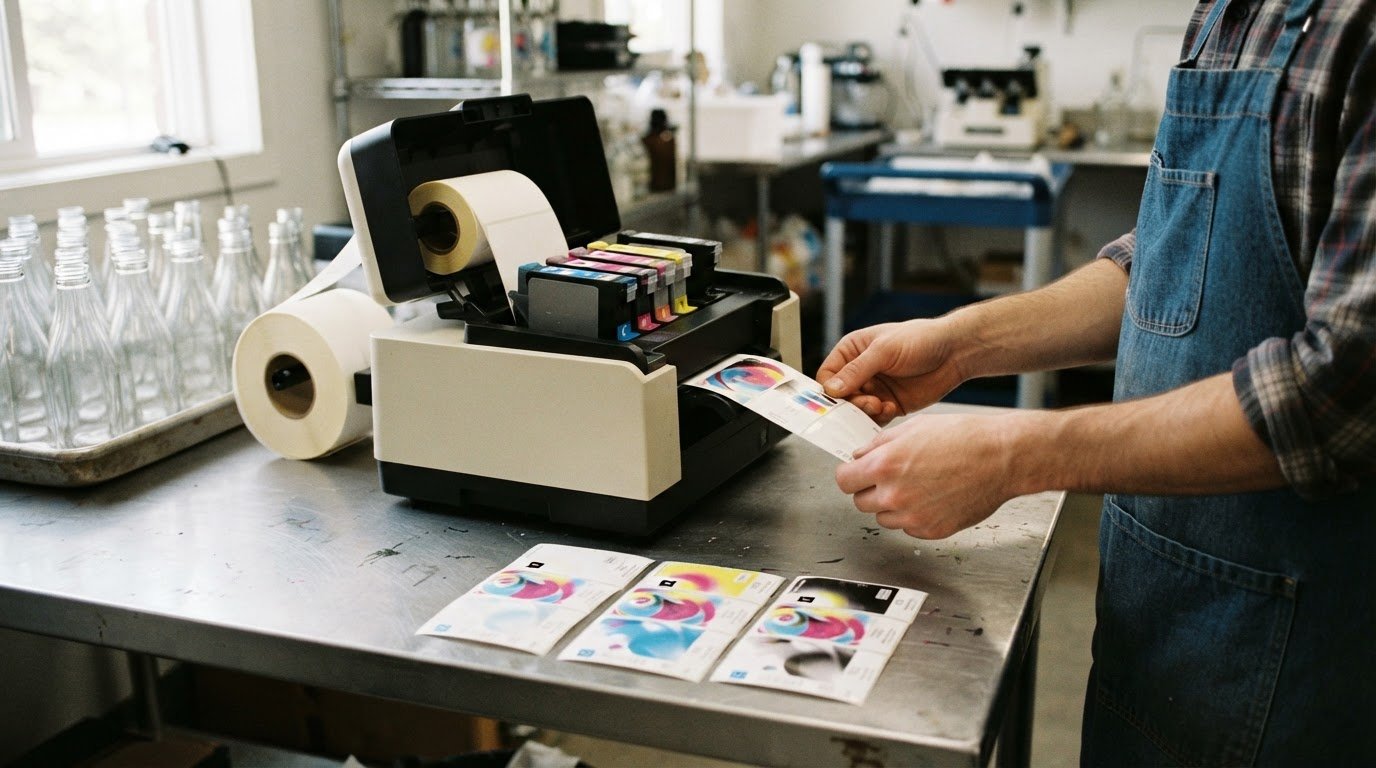
A colour label’s ink cost isn’t a fixed price per page. To calculate it, divide each ink cartridge’s cost by the number of labels it can print, then add the per-label costs for the colours used. This guide explains how to calculate ink cost for colour labels and why the result depends on your label design.
Cost per page (CPP) is useful for tracking printing expenses, but for labels, cost per label is more relevant. Start with cartridge cost and expected label yield, then refine the estimate to reflect label dimensions and how much of each colour the design uses.
Estimate labels per cartridge, combine the costs of cyan, magenta, yellow and black ink, and account for label size and colour coverage. The result is a practical way to understand ink consumption and compare printing costs.
Key Takeaways
- Estimate cartridge yield using the label design you print, since ink use varies with the artwork and coverage.
- Build a colour-label estimate by accounting for each ink separately, then combine the per-label amounts.
- Use label dimensions and colour coverage to refine estimates; label area alone doesn’t determine how much ink each colour consumes.
- Separate ink cost from the broader cost of printing, which can also include labels, maintenance, equipment and labour.
- Explore how Afinia Color Label Printers and Epson Ink Cartridges fit your printing needs and cost calculations.
Estimating labels per ink cartridge
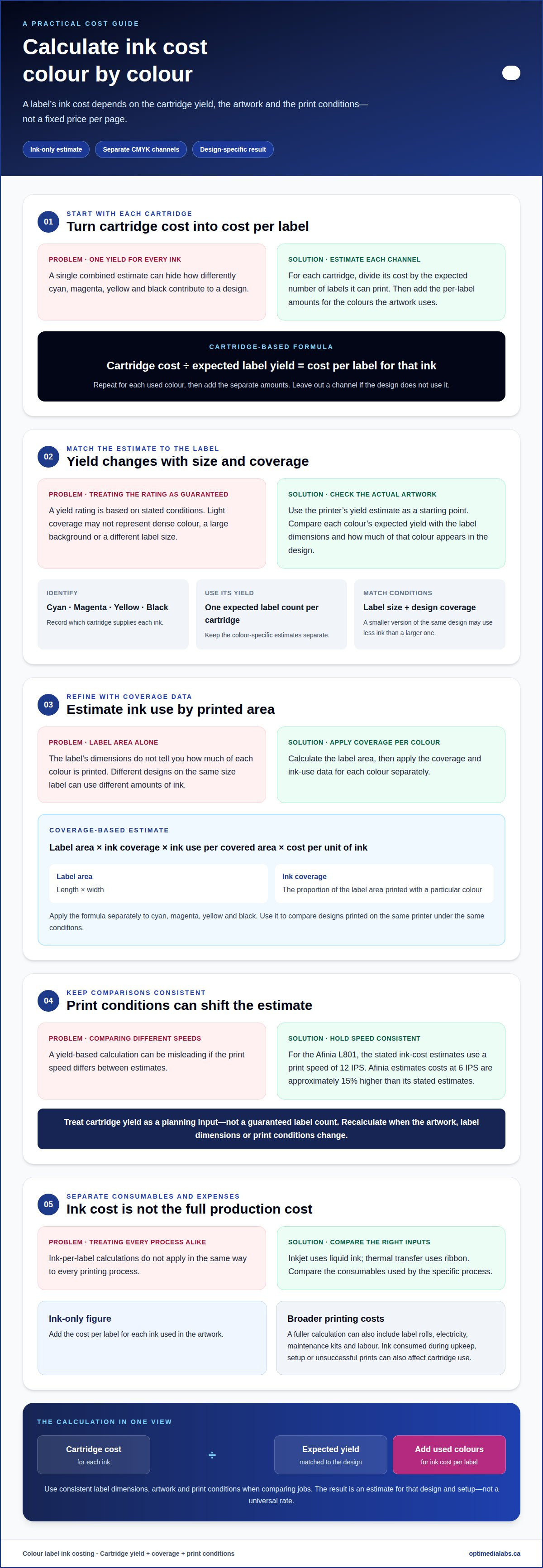
Printer yield ratings estimate how many labels a cartridge may print under stated conditions. Use the rating as a starting point, then compare it with your label dimensions, artwork and colour coverage. To calculate ink cost for color labels, remember that expected yield depends on print conditions, not just the number of labels in a job.
These example figures show why you should assess yield by cartridge colour, rather than rely on one combined estimate for all inks.
Start with the printer’s yield estimate for each cartridge and compare it with the design and label size you plan to print. A rating based on light coverage won’t reflect artwork with dense colour or a large background. A smaller label may use less ink than a larger version of the same design, so account for dimensions when applying the rating.
Keep cyan, magenta, yellow and black separate in your estimate. Each colour contributes differently to the design. Artwork with broad coloured areas and little black text won’t use the black cartridge in the same way as a design dominated by black. Compare each cartridge’s expected yield with the amount of that colour in your artwork.
- Identify the ink: Record whether the cartridge supplies cyan, magenta, yellow or black.
- Use its yield: Note the expected label count for that specific cartridge.
- Match the conditions: Account for the actual label size and design coverage.
Print speed can also affect yield-based estimates. Afinia’s L801 ink-cost estimates use a print speed of 12 IPS. At 6 IPS, Afinia estimates ink costs are approximately 15% higher than its stated estimates. Keep speed consistent when comparing calculations for the same artwork.
Use cartridge yield as a planning input, not a guaranteed count. The exact consumption can differ from an estimate because the design and print conditions matter. When considering how to calculate ink cost for color labels, connect the cartridge’s yield to the artwork and operating conditions you actually use. The Afinia label formats you plan to print can help define the dimensions for that estimate.
A basic cost-per-label estimate can include cartridge costs. A fuller calculation can also account for label rolls, electricity, maintenance kits and labour.
Calculating ink cost per colour label
Estimate ink cost by calculating the cost per label for each colour cartridge, then adding the amounts used by the design. This gives you an ink-only figure that you can keep separate from label stock, maintenance and other production expenses.
Coverage and Label Area Formula
An area-based estimate multiplies label area by ink coverage, ink use per covered area and the cost per unit of ink. Calculate label area by multiplying its length by its width. Coverage is the proportion of the area printed with a particular colour.
Use this formula to compare designs printed on the same printer under the same conditions. Apply it separately to cyan, magenta, yellow and black, since coverage and ink consumption can differ by channel.
CMYK Ink Pricing
To calculate a cartridge’s cost per millilitre in Canada, divide its price in C$ by its ink volume in millilitres. For a cost-per-litre figure, convert the volume to litres before dividing.
Use the resulting unit cost with the amount of each ink consumed per label. Unit price alone doesn’t reveal the total ink cost per label, because the design and printer determine how much of each colour is used.
For a cartridge-based estimate, divide the cost of ink consumed by the number of labels produced. If you start with the cartridge’s yield estimate, divide its cost by the expected label count to find the per-label amount for that ink. Repeat for every colour used in the artwork.
Add the separate cyan, magenta, yellow and black amounts to estimate the total. If the design doesn’t use a colour, leave out that channel. Base the calculation on the actual artwork rather than assuming every colour label has the same ink requirements.
Thermal printing uses different consumables, so ink-cost calculations don’t apply in the same way. Compare the consumables used by the specific printing process. For inkjet, coverage and print conditions affect ink use; for thermal transfer, ribbon is a separate cost input.
For a useful comparison, keep label dimensions, artwork and print conditions consistent. If you change the design, recalculate the colour-specific amounts rather than reusing the previous estimate. This makes the result more relevant for production planning and for comparing label jobs.
A coverage-based calculation can refine a cartridge-yield estimate when you have colour-specific coverage and ink-use data. Treat the result as an estimate for the particular design and setup, not a universal rate. To discuss your label-printing calculation, contact the team.
Ink consumption and cost per label
Ink use depends on the printing process, artwork and routine printer operations. When estimating production cost, include ink consumed even if it doesn’t appear on saleable labels.
Printer Types and Ink Use
Printer type determines which consumables contribute to label-printing costs. Inkjet printers use liquid ink, so colour coverage and maintenance affect ink consumption. Thermal printing costs are calculated differently.
For inkjet, calculate each colour cartridge separately, then account for ink used beyond the finished design. Thermal printing doesn’t use ink cartridges, so an ink-per-label calculation doesn’t apply in the same way. Thermal transfer systems use ribbon instead. Compare methods based on the consumables each process actually uses, not as if all printer types were equivalent.
Ink Allowance for Maintenance and Waste
A maintenance and waste allowance accounts for ink consumed during printer upkeep, setup and unsuccessful prints. Cartridge use can exceed the ink deposited on saleable labels, so include this in your estimate.
There’s no single extra amount that suits every job. Cleaning and priming frequency, print interruptions, rejected labels and the printer’s operating pattern all affect consumption. Rather than adding an unsupported percentage, record the ink issued for a print run alongside its saleable label count. Divide the total ink cost by saleable labels, not every label fed through the printer.
For a clearer estimate, separate design consumption from operating consumption. The first is ink deposited while printing the artwork. The second includes ink used for cleaning, priming and waste. Tracking both shows whether a design change or a change in printer operation has affected the cost per usable label.
Treat that figure as an example, not a fixed rate for every design. Different colour coverage or dimensions can change ink use, while maintenance and rejected prints can raise the ink cost per saleable label.
To improve your estimate, keep consistent records for each print run:
- Ink issued: Track cartridge consumption for the colours used.
- Maintenance: Record cleaning or priming that uses ink.
- Waste: Count misprints and rejected labels separately from saleable output.
- Production total: Divide the recorded ink cost by the number of usable labels.
This method links cartridge consumption to actual production, rather than assuming every cartridge’s full yield becomes saleable output. Repeat the calculation for different designs or operating patterns. Comparing the records can show whether artwork coverage, maintenance or print waste is driving changes in ink cost per label.
Label design, size and colour coverage
Label dimensions and artwork determine how much of each colour reaches the media. A broad, saturated background uses ink differently from a small logo on an otherwise unprinted label, so a label-count-only estimate can miss important differences.
Estimate coverage using the actual label dimensions and design. Multiply length by width to get label area; coverage describes how much of that area receives ink. Applying coverage to label area helps compare designs, but doesn’t predict exact consumption on its own. Cyan, magenta, yellow and black can contribute different amounts, even when two designs have similar overall coverage.
For example, a label with a large blue panel and a small black product code uses colour differently from a mostly white label with coloured text. The first may use more cyan and magenta, while the second has less printed area overall. Estimate each colour separately, since a single coverage percentage can hide those differences.
Colour values also affect the calculation. An RGB image doesn’t convert to one fixed CMYK breakdown; the conversion depends on the printer. Printed size matters too: scaling the same RGB artwork changes the area receiving ink. Assess the file at its final label dimensions and use the printer’s colour output for a meaningful estimate.
Coverage, colour profiles and material
Total area coverage, or TAC, describes the combined ink coverage across CMYK channels at a point in the image. Some CMYK profiles allow TAC of 300% or 330%, while uncoated paper may have a limit around 220%. These figures describe profile or material limits, not a universal ink-use rate for every label.
Label material and print settings affect ink use. The media and selected profile determine the permitted ink coverage, while printer settings affect how the artwork is rendered. For example, a design prepared for uncoated paper needs a different coverage limit from one using a profile that allows higher TAC.
Use a coverage estimate that matches the production setup. If your design software reports ink coverage, use its colour-specific values. If it doesn’t, estimate the printed area from the artwork or preview, then assess the colours individually. A thumbnail can help distinguish solid panels from small details, but won’t reveal exact CMYK consumption.
- Confirm dimensions: Assess the artwork at its final label length and width.
- Separate the channels: Consider cyan, magenta, yellow and black independently.
- Match the profile: Apply coverage limits appropriate to the material and print setup.
These checks make comparisons more useful. A larger label, denser colour panel or different material can change ink demand even when the label count stays the same. Keep the design, size, profile and media consistent when comparing estimates.
What is the formula for ink cost per label based on ink coverage and label area?
Use this formula for an area-based estimate: ink cost per label = sum of each colour’s label area × its coverage fraction × ink use per covered area × cost per ink unit. Calculate cyan, magenta, yellow and black separately, then add the amounts. This connects label dimensions and design coverage to the cost of ink consumed.
Start with the label’s printed area, calculated as length multiplied by width. Convert each colour’s coverage percentage to a fraction before multiplying. For example, a percentage is divided by 100 to express it as a fraction. Use consistent area units throughout, such as square centimetres for both label area and measured ink use.
The ink-use rate must match the printer, media, colour profile and print settings. If available, use measured consumption per area for each channel. Multiply that rate by the channel’s coverage and the label area, then multiply the ink volume by that colour’s cost per volume. Keep units consistent, such as millilitres and cost per millilitre.
For a CMYK design, calculate four separate amounts. A colour profile can permit total area coverage, or TAC, of 300% or 330%; uncoated paper may have TAC around 220%. TAC adds the channel coverage values at a point. It isn’t a substitute for individual channel coverage or an ink-use rate, so don’t apply it as one overall cost multiplier.
For example, a design with a coloured background and black text needs separate inputs for cyan, magenta, yellow and black. Apply each channel’s measured coverage to the same final label area, then combine its estimated ink volume with its unit cost. The total is an estimate based on those inputs, not a fixed rate for every design or printer.
- Area: Use the final printed label dimensions.
- Coverage: Enter a separate fraction for each CMYK channel.
- Ink rate: Use consumption measured for the printer and media.
- Unit cost: Match the ink-volume unit to its cost basis.
Check the calculation by changing one input at a time. If label area increases while coverage and ink rate stay constant, estimated ink volume increases proportionally. If one channel’s coverage changes, only that channel’s calculation should change. This sensitivity check can reveal unit errors or the mistaken use of total coverage instead of channel-specific values.
RGB artwork adds another variable because its conversion to CMYK depends on the printer. Calculate from the converted artwork at final print size, rather than assuming RGB values map identically across devices. For help relating label-printing requirements to a practical cost model, discuss your label calculation with the team.
OptiMediaLabs Canada
OptiMediaLabs Canada helps businesses connect ink-cost estimates to suitable label-printing equipment and consumables. If your calculations show that inkjet printing fits your label design, explore Afinia Color Label Printers and compatible high-yield ink cartridges as part of your equipment and supply planning. For workflows where ribbon is the relevant consumable, Thermal Transfer Ribbons offer a different cost input to consider.
Bring your label dimensions, artwork coverage and expected print volume into the decision. These details help you identify the printer type and supplies that fit your production needs, without treating one cost-per-label estimate as universal.
Contact OptiMediaLabs Canada to discuss your label-printing requirements.
Turn your estimate into a useful production baseline
Use your calculated cost as a starting point for planning, then compare it with ink consumption across actual print runs. Keeping records can help you make better-informed decisions about supplies and equipment as your label requirements evolve. Revisit the estimate when you update the artwork or printing setup so it continues to reflect the work being produced.
Calculating ink costs for colour labels is most useful when it supports a practical production decision. OptiMediaLabs Canada offers Afinia Color Label Printers, Epson Ink Cartridges and RFID Label Printers for businesses assessing their label-printing needs. The right fit depends on the application and workflow, not ink cost alone.
Discuss your label-printing requirements with OptiMediaLabs Canada and take the next step with a clearer plan.
Frequently Asked Questions
What is Cost Per Page (CPP)?
Cost per page (CPP) is the average printing expense assigned to one printed page. For colour labels, a per-label figure is more useful because a label’s printed area and artwork differ from those of a standard page. Keep the measures distinct when reviewing production costs. CPP can help track page-based printing, while per-label ink cost helps assess a particular label design and print run.
How do you calculate ink cost per colour label?
Divide the cost of ink consumed by the number of saleable labels produced. For a design using several inks, allocate consumption to each colour before adding the amounts. For instance, if some labels in a run are rejected, base the final figure on usable labels rather than the total printed. This is more useful for production planning than counting every label fed through the printer.
How can you estimate ink coverage for a colour label design?
Use a colour-separated preview or the coverage function in your label-design software to assess how much of the artwork uses each ink. Review the design at its final size, since resizing changes the printed area. If the software doesn’t report coverage, estimate it from the artwork’s coloured regions, distinguishing large solid areas from small details. A thumbnail can provide a rough visual estimate, but won’t measure exact ink consumption.
How can you calculate ink cost per roll or batch of colour labels?
Multiply the ink cost per saleable label by the number of saleable labels in the roll or batch. For an ink-only total, exclude media and other production expenses; add relevant expenses separately to assess broader production costs. Use the actual usable quantity, accounting for rejected labels, and keep the design and print conditions consistent. This makes batch estimates easier to compare across production runs.
How much do CMYK inks cost per millilitre or litre in Canada?
Divide each cartridge’s price in C$ by its ink volume in millilitres to calculate the cost per millilitre. For cost per litre, convert the volume to litres before dividing.